

Testing Bubble Tea Interfaces
Noteleaf's hand-rolled TUI test harness

Terminal user interfaces (TUIs) have a way of hiding their complexity behind a calm prompt. Under the surface, you’re juggling asynchronous updates, listeners for keyboard choreography, and a rendering engine that assumes a real terminal is close at hand. When I started building Noteleaf’s Bubble Tea interface, I quickly realized that the hard part wouldn’t be drawing UI elements with LipGloss or wiring in Bubbles. The real challenge would be proving that the whole experience holds together as I expand the app’s feature set. Today I’m going to walk through the test infrastructure assembled for Noteleaf, the patterns leaned on when exercising Charmbracelet models, and the little lessons learned while keeping the feedback loop fast. Everything mentioned here is live in the repository so that you can follow along in your editor or in the linked source code.
Why Spend Time on TUI Tests?
Before we dive into mechanics, it is worth replaying the motivation. Don’t worry, I’m not going to evangelize TDD. There are better resources for that (🐐). TUIs are notoriously tricky to implement regression tests for. A single missed key event can strand users, and refactors that change layouts often break muscle memory. I needed to be confident that our task editor and data browsers survive quick refactors, and to be able to do so without launching a full terminal in every unit test. The answer was to focus on the Bubble Tea model layer. Bubble Tea already treats input, update logic, and rendering as pure(ish) functions. If we can drive those functions deterministically, we can catch regressions with unit-test speed.
The Test Harness
The heart of the setup lives in internal/ui/test_utilities.go. We created TUITestSuite, a struct that encapsulates state for tests that require direct interaction with any tea.Model. This means no real terminal, no threads unless we want them, and no dependence on the default renderer. The suite captures every model update and view string, exposes helpers for sending keyboard messages, and tracks context-based deadlines so tests do not hang when something goes wrong.
The struct definition and setup code look like this:
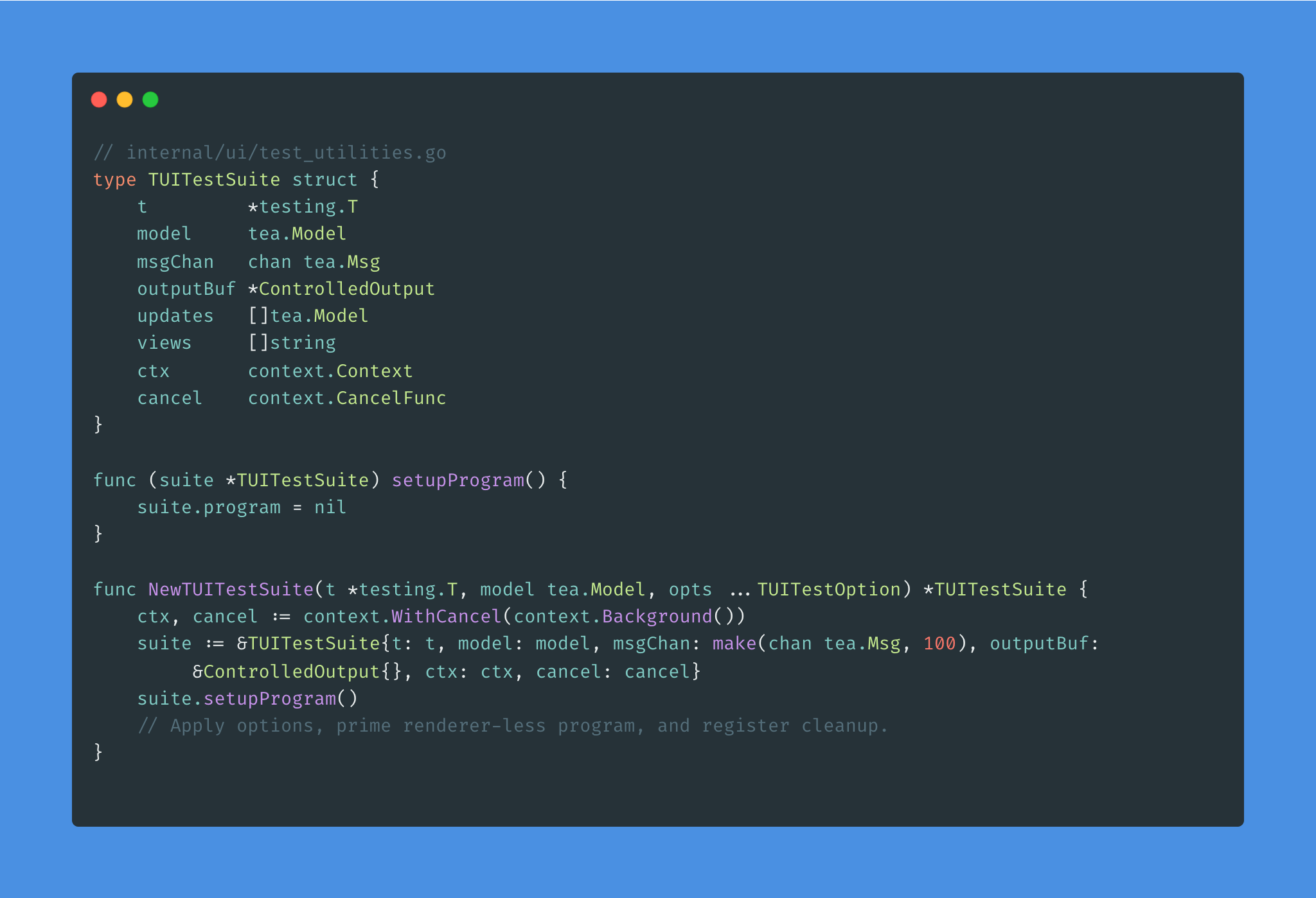
You will notice a deliberate omission in the SetupProgram helper: We never call tea.NewProgram. Instead, in tests, we’ll run Init, track the returned command, and call Update manually inside SendMessage (in class TEA fashion).
Bubble Tea models are pure enough that this keeps behavior faithful while giving tests the freedom to inject messages synchronously, suspend time, or inspect intermediate views without wrangling goroutines.
The harness also ships with a ControlledOutput writer and a dead-simple ControlledInput stub so we can capture renders when we need to assert on raw Lip Gloss strings.
Two small options make a big difference in practice.
WithInitialSizeprimes the model with a tea.WindowSizeMsg, which mirrors the behavior of real programs resizing themselves on startup.WithTimeoutwraps the underlying context so that everyWaitForcall shares a deterministic deadline.
Both are defined alongside the suite in test_utilities.go, and they keep tests concise: we express the “terminal” dimensions we care about and let the harness enforce timeouts.
Driving the Model
Once the harness is in place, most tests read like transcripts of user flows. In internal/ui/task_edit_interactive_test.go, we rehearse how a human edits a task, flips between priority schemes, and navigates the status picker. The suite provides SendKey, SendKeyString, and SendMessage, making it easy to express those flows.
A representative sequence from that file looks like this:
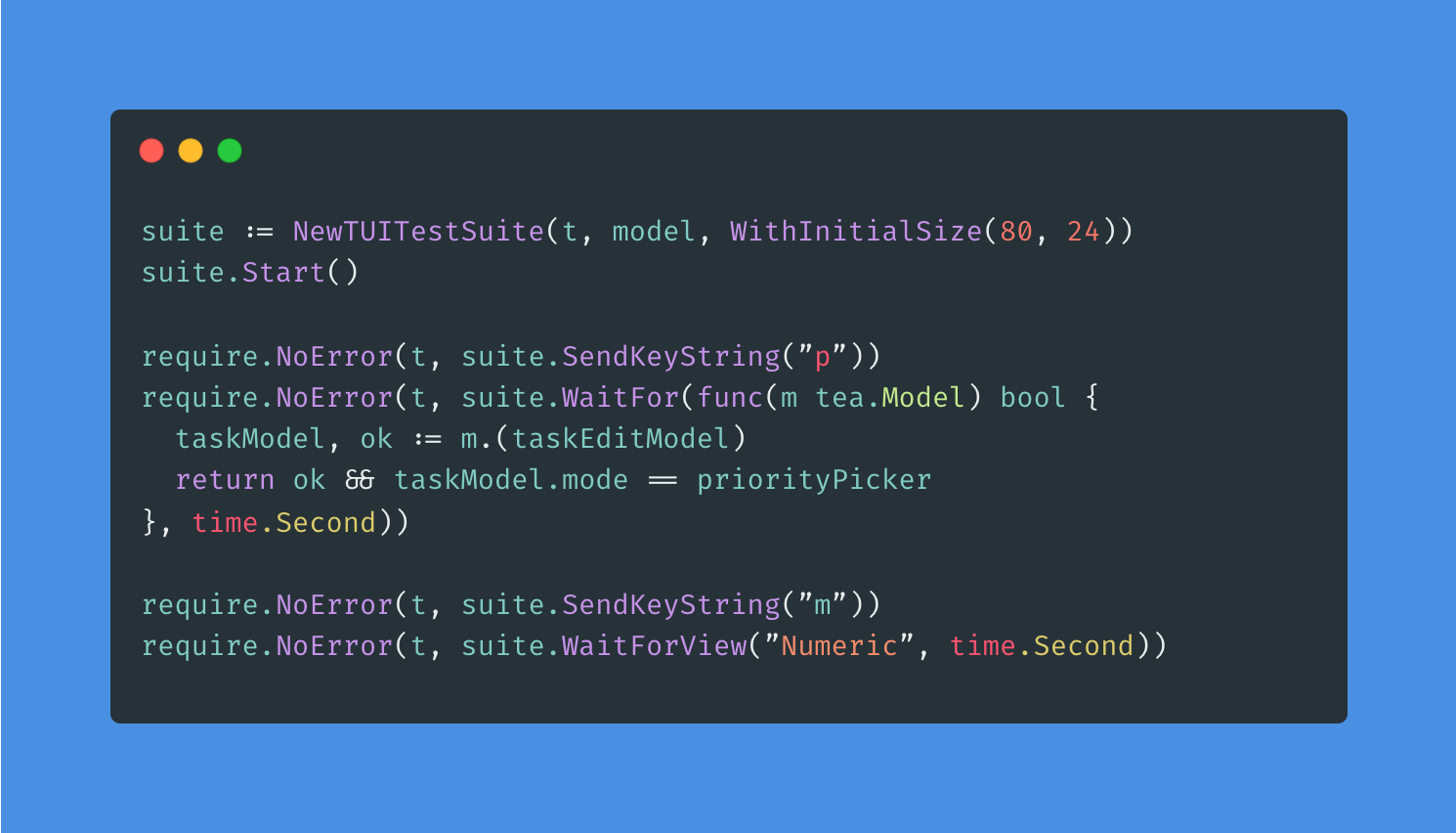
This snippet highlights two philosophical decisions.
First, we keep model instances type-safe by casting inside the predicate rather than leaking internal state to the test harness.
Second, we wait for conditions instead of asserting immediately after a key press. Bubble Tea updates often fan out through commands, so giving the model a heartbeat to settle avoids race conditions without sleeping arbitrarily. The suite’s WaitFor helper polls the latest model snapshot every 10 milliseconds and respects the per-test context timeout. When conditionals remain false, the helper returns a wrapped error that is easy to debug. The same file uses SimulateKeySequence for longer workflows. By pairing key events with optional delays, we can mimic the rhythm of real navigation — for example, tabbing through fields and typing text before hitting Enter to persist a change. Because the harness records every intermediate model, assertions can target either the new view or the final state of the struct, whichever is more meaningful for the scenario under test.
Layered Assertions and Helpers
To keep assertions readable, we packaged a tiny helper set inside the same utility file. The Expect.AssertViewContains and Expect.AssertModelState helpers (see internal/ui/test_utilities.go) wrap the repetitive parts of checking the latest view or verifying an invariant on the current model.
These helpers lean on a shared string utility, shared.ContainsString, which normalizes text checks so we can write assertions without worrying about ANSI color sequences that Lip Gloss might add later.
We still write vanilla assertions when the outcome is obvious (for example, checking a boolean flag), but being able to say “assert that the view contains x” as a single line keeps the tests focused on behavior instead of mechanics. This also makes the intent obvious when reading failures in CI.
Pure Model Tests Still Matter
Not every test fires up the harness. For pure update logic, we lean on direct model instances, which keep the signal-to-noise ratio high and avoid unnecessary casts in the test body. The task editor tests in internal/ui/task_edit_test.go are a great example. In it, we build a fully initialized taskEditModel, feed it key messages by hand, and assert on struct fields immediately. Because Bubble Tea models implement the tea.Modelinterface, this style works in parallel with the harness-based tests. We tend to start with direct model tests to pin down deterministic rules (e.g., how priorityMode cycles when you press m). Then we add an integration-style harness test when we want to guarantee real key bindings stay wired up. This dual approach also pays off when Charmbracelet releases updates. Bubbles components like textinput or help occasionally change their internal focus behavior.
Our pure tests cover how we configure those components up front, while the harness-driven tests confirm the Bubble Tea glue code still reacts to real key events the way we expect.
Exercising Bubbles Components
Many of our models embed “bubbles.” The authentication form, for instance, uses two textinput fields with custom placeholders, echo modes, and focus rules. Our authentication form in internal/ui/auth_form_test.go shows how we verify those pieces without hitting the network. We initialize the model with or without a pre-filled handle, call Init to trigger the focus command Bubble Tea generates, and then lean on the harness to send keys:
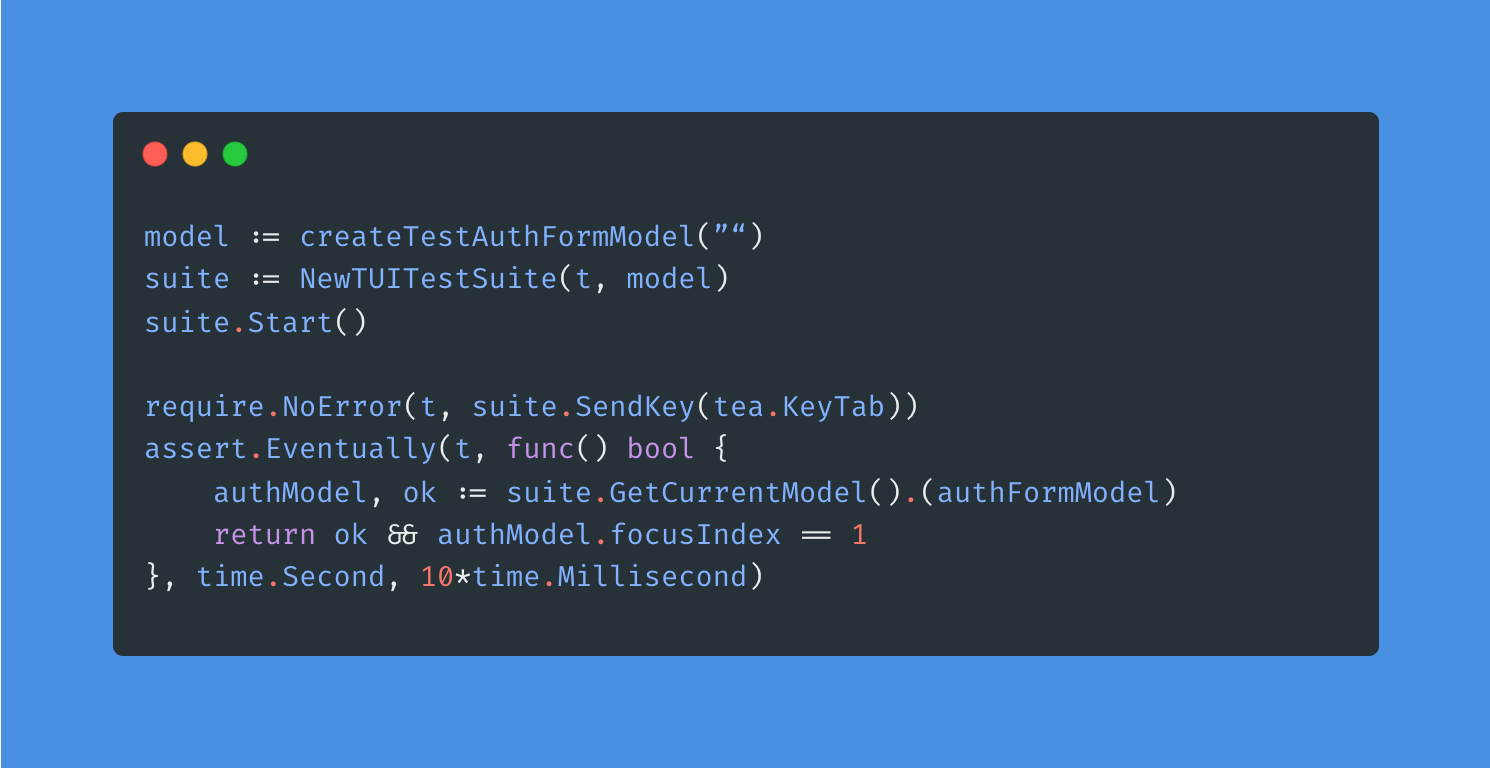
Because the harness records the entire model, we can inspect component state without exposing setters just for tests. We can also assert that locked fields stay read-only, that validation messages appear inside the render output, and that submission flags flip when we trigger the shortcuts advertised in the help bubble. The tests run in milliseconds yet cover the interactions most likely to break when we tweak key maps or swap in a different Theme function from LipGloss.
Mocking Data Sources for Lists and Tables
Our data browser elements (DataList and DataTable) fetch records asynchronously and support filtering, searching, and pagination. Rather than connecting to an external service every time (though, because we use SQLite, there are examples of using a test repository in the codebase), we provide in-memory mocks that satisfy the same interfaces. You can see these in internal/ui/data_list_test.go and internal/ui/data_table_test.go. The mocks let us specify canned responses, inject errors, and verify that the models respond by showing toasts or falling back to static rendering. When paired with the harness, we can even step through search flows: focus the search field, type the query, send/type Enter, and wait for the view to update with filtered rows. One happy side effect is that these tests double as documentation for our model interfaces. When someone needs to add a new sortable column, they can read the table tests and see exactly which methods are required on the record type.
Handling Time, Commands, and Side Effects
Bubble Tea commands (tea.Cmd) are the trickiest part of testing TUIs because they hide asynchronous work behind function closures. In our current models, most commands either quit the program or kick off a repository operation. The harness’s executeCmd function is intentionally minimal. Right now, it ignores commands unless a test stubs in specific behavior. That gives us complete control over when asynchronous work happens.
When a new model needs to assert on command results, we wrap the command in a test implementation that captures messages and pushes those messages back into the suite with SendMessage.
The key is that we never have to start a separate Bubble Tea program or juggle channels ourselves; the harness keeps the execution single-threaded unless we want to test concurrency that we’ve added.
Time-sensitive logic is handled the same way. We either pass a deterministic clock to the model or use WaitFor with generous deadlines.
The WithTimeout option protects us from infinite waits when a predicate is wrong, while still letting tests use time.Sleep for small delays when trying to simulate the cadence of a real user. This is something you can observe in video scripting tools like VHS (also by charm!)
Bringing Charm Libraries Together
Charm publishes more than Bubble Tea, and our tests keep those pieces aligned. We use the help bubble extensively to advertise key bindings, so our harness tests assert on strings like “enter/ctrl+s: submit” to guarantee the instructions stay accurate.
LipGloss powers color and layout, but the harness captures raw strings without ANSI sequences. That means our tests verify semantic content like titles, selected markers, and validation hints, without flaking because of styling tweaks. When we migrate to a new color palette, we expect the snapshots to stay valid because we are intentionally leaving styling assertions to higher-level smoke tests. LipGloss changes are fun; they should not break sensible tests.
Tips for Extending the Suite
If you are adding a new Bubble Tea model to Noteleaf, try this playbook:
Start with pure model tests that drive
Updatedirectly.
They run fast and force you to think about state transitions explicitly.Pull in
NewTUITestSuitewhen you bind real key maps or need to verify window-size handling. Reach forWaitForandWaitForViewinstead of custom polling to keep timeouts consistent.Mock repositories and data sources instead of reaching into production packages. The existing mocks for tasks, list items, and table records are flexible enough to reuse or crib from.
Assert on intent, not styling. Focus on flags, indices, and the view’s output.
Wrapping Up
Testing TUIs can feel daunting, but Bubble Tea’s functional core makes it possible to write expressive, reliable tests without firing up a terminal window. By centralizing the harness in TUITestSuite, leaning on Bubbles components’ predictable APIs, and mocking the data layer, we get rapid feedback that matches real user behavior. The patterns above have scaled from the original task editor to authentication, data browsing, and beyond, and we expect them to keep paying dividends as we explore more of Charm’s ecosystem.
If you are curious to see these ideas encoded in full, clone the repository and explore the linked files; there is plenty more to borrow, extend, or remix for your own Bubble Tea projects.
teatest
Charmbracelet quietly publishes a small experimental package called teatest, which aims to provide an official testing harness for Bubble Tea programs. It wrapstea.Program in a controlled environment that behaves like a headless terminal, similar in spirit to our internal TUITestSuite, but with a slightly different philosophy.
Where our approach isolates the model layer and drives it manually, teatest preserves the full Bubble Tea event loop. It spins up a TestModel process that runs a tea.Program under the hood, captures output frames, and exposes helpers for deterministic teardown and output comparison. This makes it a strong option to test rendering fidelity or program-level behavior rather than individual model transitions.
What teatest Provides
Program-level execution: It executes a complete Bubble Tea program in a virtual terminal, preserving the message queue and renderer.
Golden-file testing: Helpers like
RequireEqualOutputmake it possible to snapshot rendered output and compare it across commits.Timeouts and terminal sizing: Options such as
WithFinalTimeoutandWithInitialTermSizehelp reproduce stable terminal environments.Final model capture: Once the program exits,
FinalModelreturns the last model state for inspection without reflection hacks.
These features overlap with parts of our own harness but operate at a higher level, closer to how users experience the application.
When to choose teatest vs. other harnesses
Use
teatestwhen you care not just about internal model transitions but about full-program behavior: layout, rendered view, entire event loop.Be aware that because it runs the full event loop (via
tea.Program), tests can be heavier, less fine-grained, and potentially slower. The article you referenced even explains why a custom harness (model-only) was chosen instead.If your need is “did the screen change as expected after a sequence of keys?” then
teatestis a strong fit. If you need “Did the model change its internal flags correctly when I press these keys?”, a lighter harness may suffice.
To adopt teatest, take a look at this article on Charm’s blog.
Why We Chose to Roll Our Own (for Now)
teatest is elegant, but it carries trade-offs that didn’t fit Noteleaf’s priorities early on:
Experimental status: It lives in the
x/expnamespace, meaning API stability is not guaranteed.Full-program semantics: Because it runs the entire event loop, tests tend to be heavier and less deterministic when commands trigger asynchronous effects.
Output focus: The golden-file strategy excels at catching layout regressions, but we needed fine-grained state inspection and control over command timing.
By contrast, our internal TUITestSuite treats models as pure state machines. There are no threads and no renderer letting us assert on intermediate states as often as we need. That design keeps the test cycle fast and predictable.
When teatest Might Be the Better Fit
If you are building a simpler TUI or care deeply about pixel-perfect layout regressions in menus, tables, or dashboards whose visual shape must not drift, teatest deserves a look. It will likely continue to grow as the de facto standard for verifying Bubble Tea applications as the Charm ecosystem converges around consistent (and more awesome) tooling.